KEEP IN MIND
- Read amounts, caps and rates across the row.
- Check both food cost and housing.
- Assign one job and observe the result.
- Back up before moving between forks or builds.
Inspect the opening resource rows
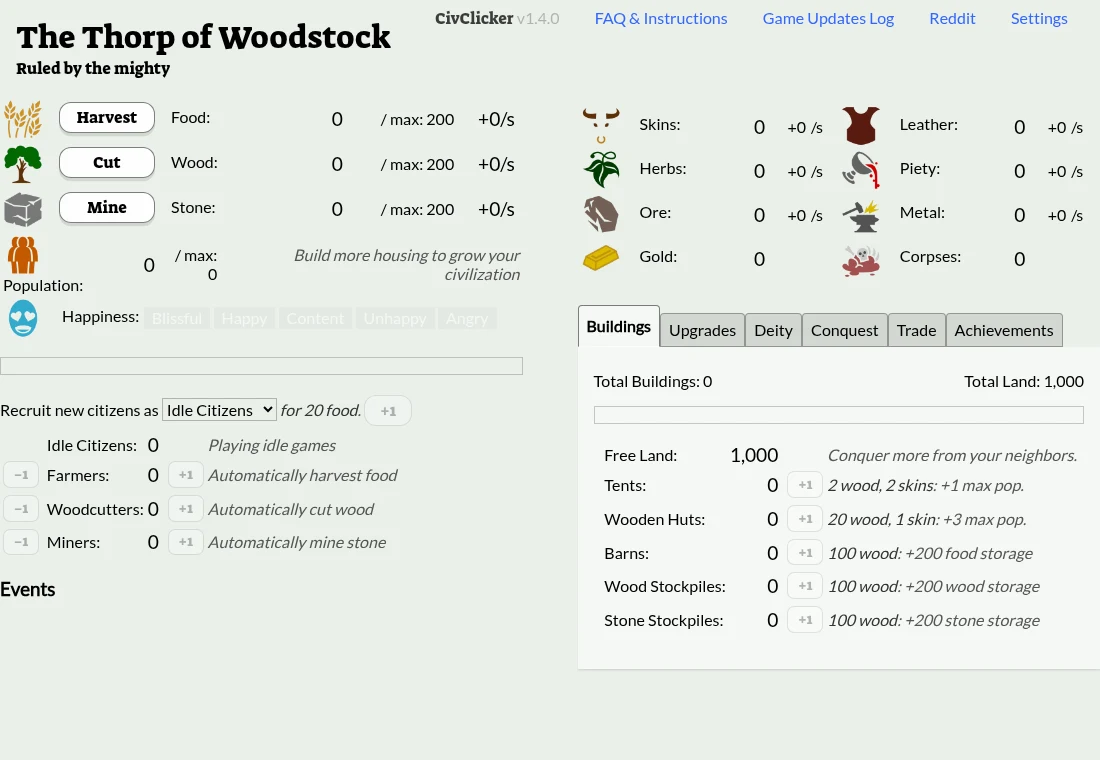
The linked fork starts with Harvest, Cut and Mine controls, plus current amounts, capacity and production rates. Read a row across rather than watching only its first number. A manual action, an automatic rate and a storage cap give you different information about what the settlement can do next.
Check housing before recruitment
The population panel identifies available room, while recruitment has a resource cost. Satisfying one does not remove the other constraint. Look at both before making a new citizen the immediate goal. The current game’s requirement labels are a better reference than a purchase sequence written for another CivClicker version.
Use one worker to learn a job
The interface exposes farmers, woodcutters and miners alongside their production descriptions. Assign a small amount of work, then watch the relevant rate and stock. That gives you a way to recognize the effect of a later reassignment. Do not change several categories at once while trying to understand the first resource balance.
Check capacity when a stock stops growing
An amount at its maximum will not answer a production shortage in the same way as an empty store. Inspect storage options before adding more of the same producer. This is a practical diagnostic distinction; the best next purchase still depends on the costs and unlocked choices in the active build.
Back up this specific fork
The maintainer labels its Pages build as development code and provides separate links to stable and original releases. Its Settings contains manual save, autosave and export/import controls. Keep an export and the host URL together before switching versions. A similarly named game elsewhere is not evidence of compatible storage or identical rules.