KEEP THIS HANDY
Controls at a glance.
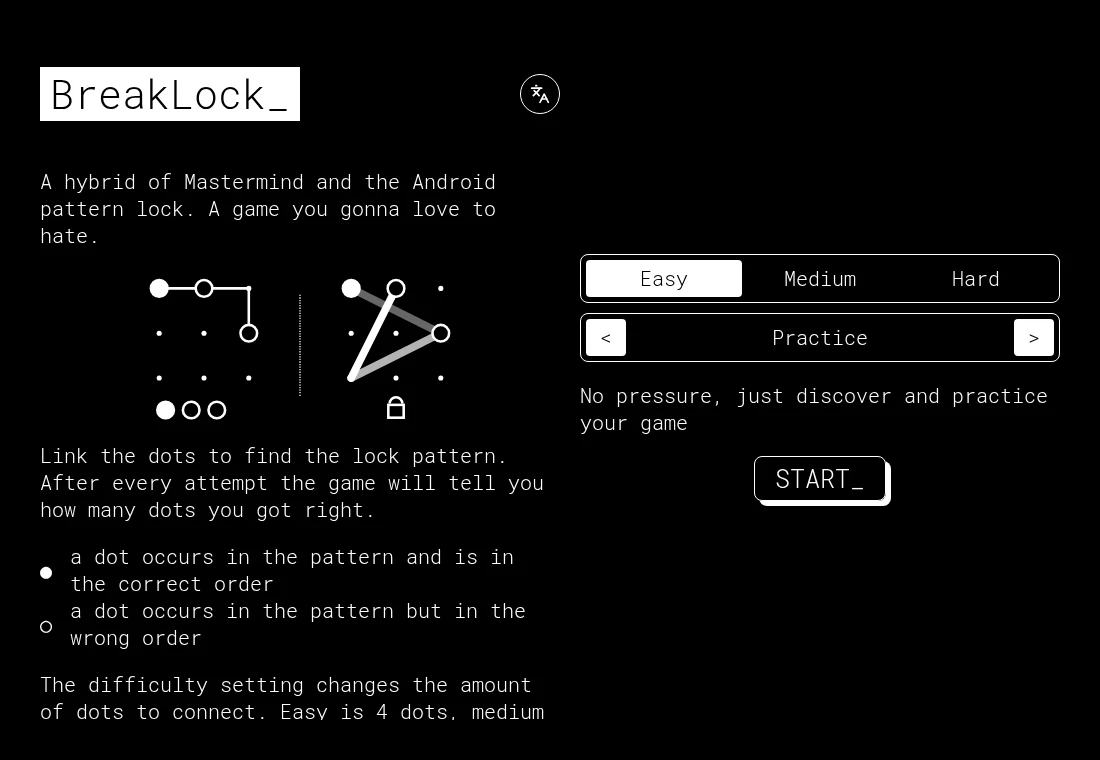
- Draw a pattern
- Connect the required number of dots in order.
- Filled feedback dot
- A chosen dot is in the pattern in the correct position.
- Hollow feedback dot
- A chosen dot belongs to the pattern but is in the wrong position.
The pattern is an ordered answer
BreakLock combines Mastermind-style deduction with a drawn lock pattern. Finding the right dots is only part of the task: their order also matters. Its feedback reports those two kinds of correctness separately.
Difficulty changes the length
The original instructions specify four connected dots for Easy, five for Medium and six for Hard. Learn how feedback behaves on Easy before adding more positions to reason about.
Practice before the clock
Practice lets you work without pressure. Challenge permits ten attempts, while Countdown gives one minute with no attempt limit. These are rules from the game’s English instructions, not estimated session lengths.
What happens to your progress?
Treat an in-progress pattern as a session, not a backed-up campaign.
Check the save and backup guide ↗A FEW USEFUL ANSWERS
Before the next click.
What is the difference between filled and hollow feedback?
Filled means a correct dot in the correct order. Hollow means a dot is present in the answer but is in the wrong order.
Is this an Android utility?
It is a standalone web puzzle inspired by pattern locks. It does not unlock devices.
Is a keyboard required?
The developer describes it as mobile first. Drawing the pattern is the main input; a touch screen or pointer is the relevant choice.
A useful next read.
Choose a game for the controls you have. ↗Follow the source.
maxwellito and contributors. Licence notice. MIT.
Latest collected source change: Merge pull request #51 from Mattiz6276/main (opens a new tab) . Repository activity does not identify the hosted game version.
All media and source credits ↗