KEEP THIS HANDY
Controls at a glance.
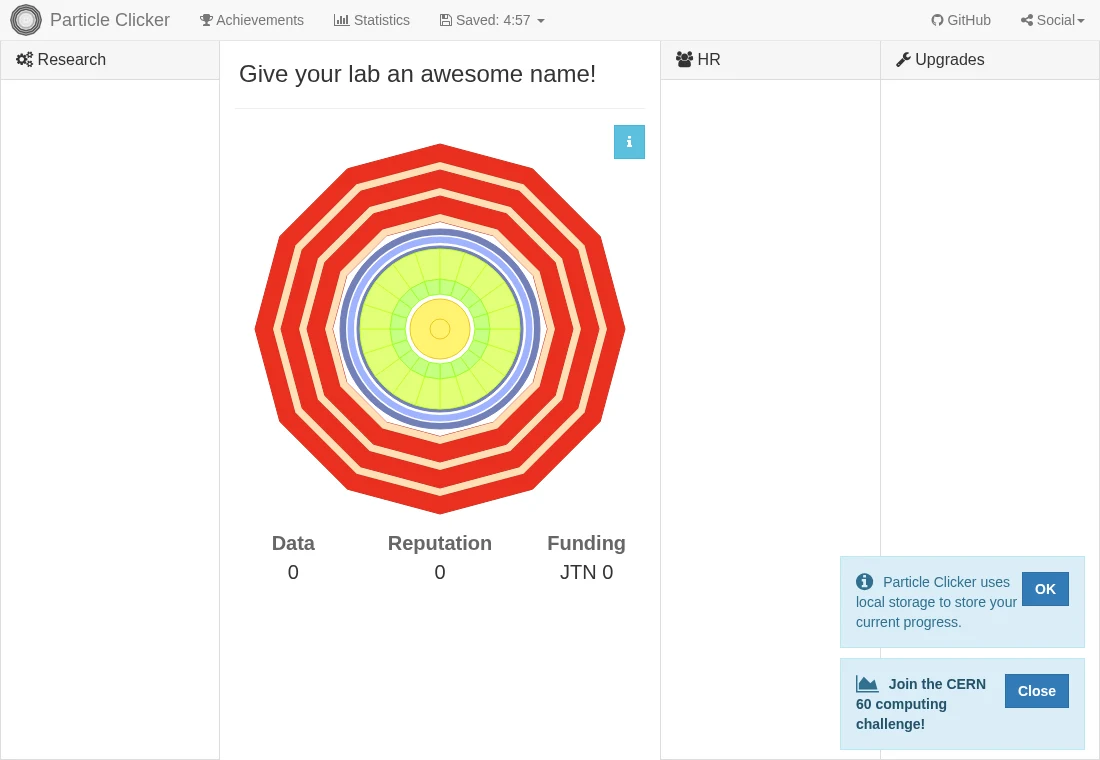
- Click the detector
- Generate events and data.
- Research controls
- Spend the displayed data cost on available research.
- Saved menu / Save now
- Use the project’s visible save command and check its saved time.
Follow the resource chain
The detector generates events, and the interface presents data as the input for research. Available research items show their data costs and the reputation they provide. Start by following that short chain so that later laboratory choices make sense; repeatedly clicking without reading the next cost can hide which resource is actually limiting progress.
Read the research along the way
The project was developed at CERN Webfest and describes its educational focus as the history of high-energy particle physics. Research entries are part of that focus. Treat them as introductions to discoveries and context rather than as a substitute for a physics course or a faithful financial model of operating a laboratory.
Check local storage before leaving
The source stores game objects in localStorage and provides a manual Save now control. It also has a warning path for unavailable storage: reloading can then discard progress. A visible game interface alone does not verify a working save. Stay on the same origin and profile, and check the save feedback before closing a long-running session.
What happens to your progress?
Uses localStorage, with a Save now control. Without storage, the source warns that a refresh loses progress.
Check the save and backup guide ↗A FEW USEFUL ANSWERS
Before the next click.
Is it a particle-physics simulator?
The project describes an incremental game teaching the history of high-energy physics. Its resource system is a game abstraction.
Does the guide store my lab?
No. Saving happens on the game host, using its own storage and controls.
A useful next read.
Incremental games: find the bottleneck, then protect the save. ↗Follow the source.
Particle Clicker team; created during the 2014 CERN Webfest. Licence notice. MIT project; individual third-party notices remain upstream.
Latest collected source change: Merge pull request #107 from dbolton/patch-1 (opens a new tab) . Repository activity does not identify the hosted game version.
All media and source credits ↗