KEEP THIS HANDY
Controls at a glance.
- Mouse drag
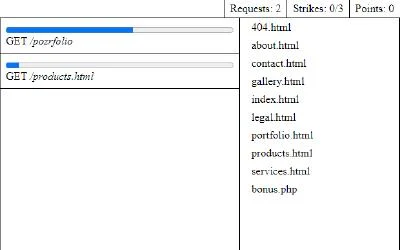
- Pick up a file and drop it on a request.
- Request list
- Read which file is being requested.
- 404.html
- Use the provided response for a bad request.
Deliver the right file for each request
Play a person behind a website server who must answer incoming requests promptly. Drag the requested file onto the matching request before it is too late.
How the game works
A bad request can be answered with the supplied 404.html file. Check the request itself rather than sending the same response to every item.
A practical starting point
The task is paced by arriving requests. Learn where the available files sit, then compare each request with the file name before dragging it to the destination.
What happens to your progress?
A portable save or cross-device synchronization is not established by the reviewed documentation. Check the original game before relying on a later return.
Check the save and backup guide ↗A FEW USEFUL ANSWERS
Before the next click.
What should I send for a bad request?
The creator points to the provided 404.html file.
Does this site’s Saved button keep my progress?
Saved keeps a link to this profile on your device. Game progress belongs to the game and its host.
A useful next read.
Build a small route, then inspect its bottleneck. ↗Follow the source.
Erwin Andrés. Licence notice. Source and image rights remain with their creators; see notices.
Latest collected source change: Update genres (opens a new tab) . Repository activity does not identify the hosted game version.
All media and source credits ↗