KEEP THIS HANDY
Controls at a glance.
- Left / right arrows
- Move around the tower.
- Space
- Jump between ledges.
- Score display
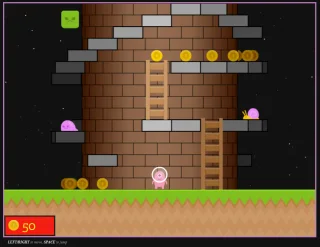
- Watch collected coins register on the HUD.
Read the rotating surface
Movement changes which part of the tower faces you. A platform near the side of the cylinder may be harder to judge than one centered in front of the character. Start with a short arc and watch the geometry rotate before committing to a jump at the edge of the view.
Keep the next landing visible
A coin gives a reason to move, but the next solid ledge is the more useful first target. Approach a jump slowly enough to understand the departure point and landing surface. These are observational opening tips, not a verified route through every part of the tower.
Treat it as the prototype it is
The README lists a level exit, multiple levels, elevators and a game menu among future features. Reaching a high ledge does not establish a finished campaign or an undiscovered ending. The catalogue describes its playable movement experiment and links its source without presenting the planned feature list as current content.
What happens to your progress?
Persistent campaign saving has not been established by the reviewed documentation. Treat the linked build as a session unless its menu says otherwise.
Check the save and backup guide ↗A FEW USEFUL ANSWERS
Before the next click.
Does the project document a complete campaign?
No. Its README identifies it as a prototype and lists multiple levels and an exit as future features.
Does it support touch controls?
Touch support appears in the project’s future-feature list; the checked controls are keyboard inputs.
A useful next read.
Platformer practice: make one landing repeatable. ↗Follow the source.
Jake Gordon and the asset creators listed in the project README. Licence notice. MIT project; retain upstream artwork notices.
Latest collected source change: updated links s/codeincomplete.com/jakesgordon.com (opens a new tab) . Repository activity does not identify the hosted game version.
All media and source credits ↗