KEEP THIS HANDY
Controls at a glance.
- Arrow keys
- Move the ship.
- Space
- Start from the title and fire during play.
- Lives / score display
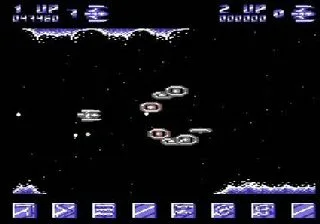
- Check survival and scoring above the playfield.
Follow a formation before chasing points
A wave has a path through the screen. Stay clear long enough to see that path before moving into its middle. The useful first lesson is how the ship responds to a short directional input while the scenery continues to scroll. This is opening advice, not a claim that a particular route clears the game.
Keep controls in the game frame
The original page documents arrows and Space. Click the game area if the browser is scrolling the page instead of moving the ship. Keyboard focus belongs to the original host after you open it; saving this profile on Ported2Browser does not transfer input or state to the game.
Read the project’s unfinished scope
The README lists power-ups, additional alien behaviors and high scores among future work. Those items should not be treated as features already available in this build. It also credits borrowed graphics and music separately from its MIT code, which is why the catalogue links to the creator’s game rather than republishing its files.
What happens to your progress?
Persistent campaign saving has not been established by the reviewed documentation. Treat the linked build as a session unless its menu says otherwise.
Check the save and backup guide ↗A FEW USEFUL ANSWERS
Before the next click.
Is this the original Commodore 64 release?
No. It is Jake Gordon’s separate JavaScript homage.
Can I use a touch screen alone?
The checked game page documents arrow keys and Space; a touch-only scheme is not established here.
A useful next read.
Small action games: learn the second action. ↗Follow the source.
Jake Gordon and the asset creators listed in the project README. Licence notice. MIT code; music and graphics have separate third-party credits.
Latest collected source change: updated links s/codeincomplete.com/jakesgordon.com (opens a new tab) . Repository activity does not identify the hosted game version.
All media and source credits ↗