01 / GET YOUR BEARINGS
How to start Minecraft Classic
Freeform building with a deliberately small set of blocks.
Make a small landmark
Open the official game and wait for the world. Choose an easy-to-find patch of land for your first build.
Try one block and one shape
Learn placing and removing blocks with a short wall before attempting a larger structure.
Check your return path
Before investing in a large world, inspect the menu and understand what the host preserves.
02 / KEEP THIS HANDY
Minecraft Classic controls
These notes describe the selected project. Read its current control instructions on the original website.
Creator’s control instructions
For device and input help, see the keyboard, pointer and touch guide.
03 / BEFORE YOU CLOSE
Saving progress in Minecraft Classic
Not verified
Favorites keeps this guide link. For game progress and backup checks, read the save and backup guide ↗.
04 / KNOW THE VERSION
About this Minecraft Classic project
- Genre
- Sandbox
- Project type
- Browser port
- Graphics
- Block-based 3D / WebGL
The attraction is the small palette
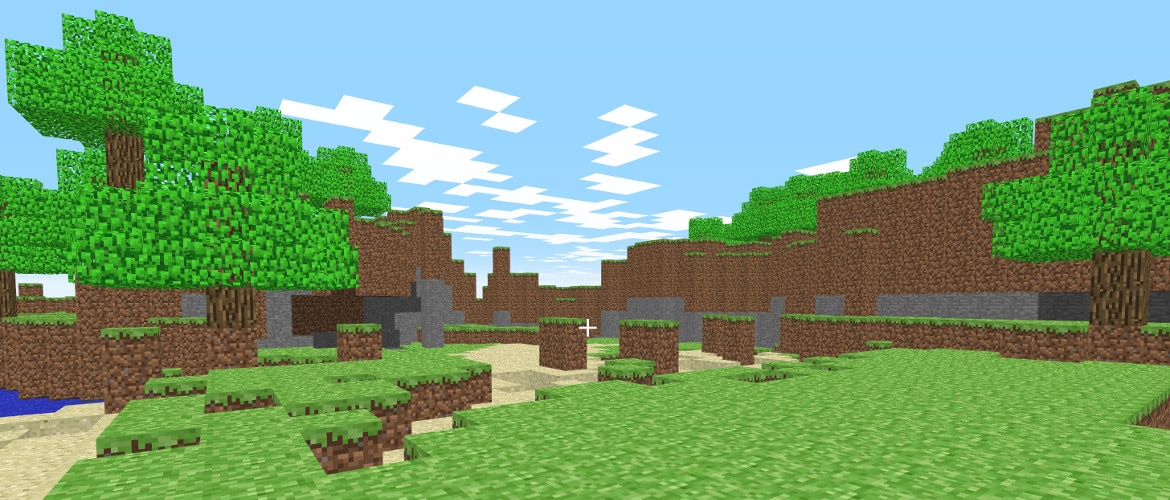
Classic is a useful choice when you want to make something immediately without managing hunger, recipes or a long technology tree. A limited set of blocks makes shape and placement the main decisions. Start with a recognizable object, then use the surrounding landscape as part of the design.
Classic is a specific historical version
Mojang’s anniversary release recreates early Minecraft with 32 blocks and the quirks of that period. This is not a browser copy of the current Java or Bedrock edition. Do not expect modern survival progression, current servers, modern redstone systems or parity with your purchased desktop game.
A desktop building session
The official opening page checks keyboard and graphics requirements. A phone-sized guide page is useful for browsing, but it does not make the game touch-compatible. Keep the original host open, allow the scene time to load and separate a WebGL problem from a mouse that has not captured focus.
Original host and official release notes checked November 6, 2026. Long-session world restoration has not been independently verified.
05 / QUICK ANSWERS
Minecraft Classic questions
Is this an official Minecraft browser game?
Yes. The play link leads to Mojang’s Minecraft Classic site, referenced by its official anniversary article.
Does it include modern survival Minecraft?
No. This is the early creative building version with a small block palette.
Can I play it on a phone?
The official page requires keyboard input. A desktop keyboard and mouse are the intended choice.
06 / FOLLOW THE SOURCE
Minecraft Classic sources & credits
Mojang / Microsoft; official Minecraft Classic browser release. Commercial original; official hosted release, no redistribution licence claimed. Licence & asset notice.
All media and source credits ↗KEEP GOING