KEEP THIS HANDY
Controls at a glance.
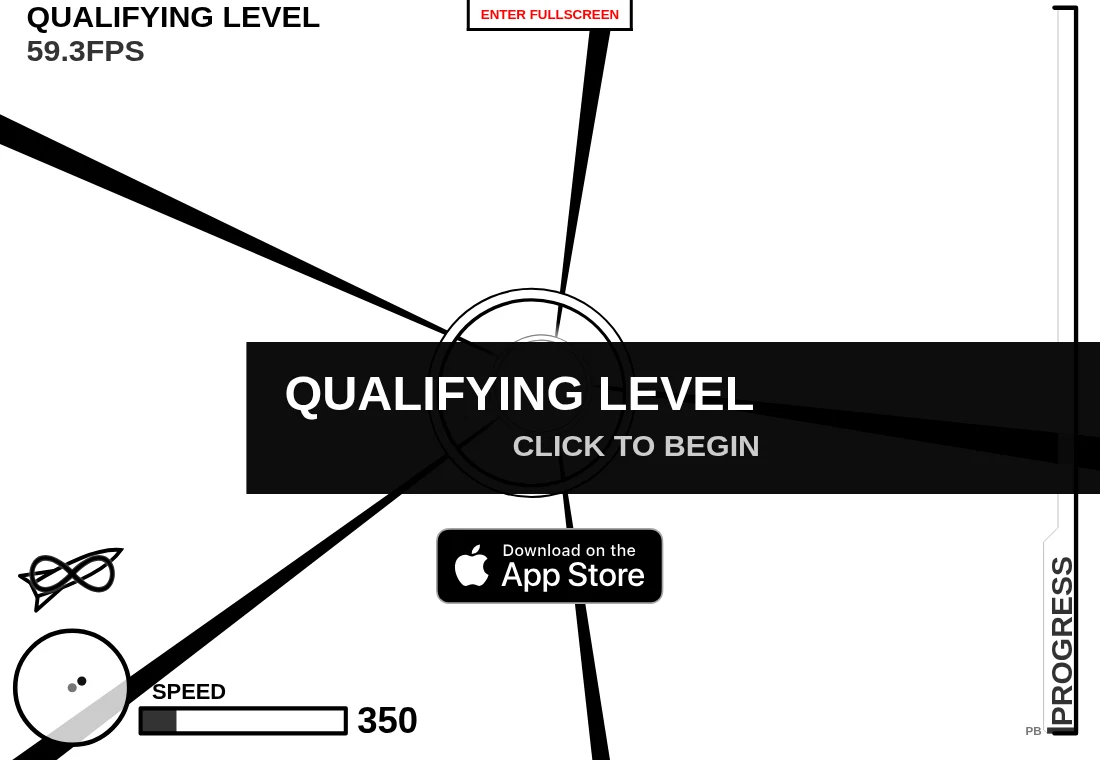
- Click the playfield
- Begin from the qualifying-level prompt.
- Pointer movement
- Steer through openings in the approaching barriers.
- Fullscreen button
- Use the host’s fullscreen control if you want a larger playfield.
Follow one barrier through its approach
The perspective view makes distant openings small and nearby edges move quickly. During early attempts, follow the nearest barrier long enough to understand its rotation. A gap visible now may move before contact. Small corrections give you a better sense of how pointer movement changes the flight path.
Use the next attempt to change one habit
After a collision, identify whether you aimed late, moved too far or followed an opening that rotated away. Choose one of those to adjust. Repeating the same broad sweep at increasing speed makes it difficult to tell which part of the movement caused the crash. This is a practice method, not a guaranteed route through a generated sequence.
SVG is part of the project’s identity
The author chose SVG while experimenting with browser graphics. The README describes a geometry library used for collision calculations and distinguishes the main AGPL project from the lib folder. This is a rewrite of the older Flash game; a link to its predecessor does not mean a Flash plug-in is required for this version.
What happens to your progress?
No persistent campaign or save export is documented in the reviewed project.
Check the save and backup guide ↗A FEW USEFUL ANSWERS
Before the next click.
Do I need Flash?
This rewrite uses SVG and JavaScript. The README identifies Flash as the technology of the earlier game.
Can I stop and resume a flight later?
No persistent resume system is documented in the reviewed source information.
A useful next read.
Missile Game: aim where the gap will arrive. ↗Follow the source.
B. W. H. Mather; a rewrite of Damien Clarke’s Flash game; geometry library by Kevin Lindsey. Licence notice. AGPL-3.0 main project; lib directory has separate terms.
Latest collected source change: Add menu to top of screen to enable and disable fullscreen (opens a new tab) . Repository activity does not identify the hosted game version.
All media and source credits ↗